
Convert Amazon Gift Card Link to Code (Without Redeeming)
Why Do You Need to Extract the Code Instead of Clicking Redeem?
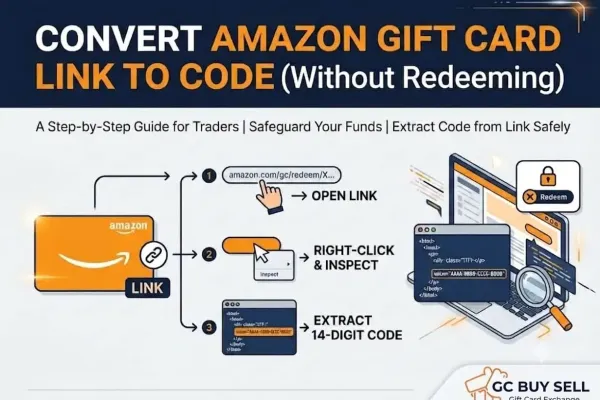
When you click on an Amazon gift card recipient link directly, the system automatically prompts you to apply the balance to your logged-in account. Once a gift card is redeemed to a personal profile, the balance gets permanently locked and cannot be transferred, shared, or traded with anyone else. To keep the gift card transferable or ready for exchange, you must extract the raw claim code directly from the link without clicking the redeem button.
Step-by-Step: How to Retrieve the 14-Digit Amazon Code from a Gift Link
Step 1: Log in to your Amazon account. Log in to your Amazon account using any desktop browser. This method works across all Amazon regional domains (.com, .co.uk, .ca, etc.).
Step 2: Open the gift card link in the same browser. Paste and open your Amazon gift card link in a new tab within the same browser where your account is already logged in.
Step 3: Inspect the "Apply to Balance" button. Carefully move your mouse cursor over the Apply to Balance button.
Important Precaution: Do NOT left-click the button, as doing so will instantly redeem the balance to your account. Work strictly with right-click controls. Right-click directly on the button and select Inspect (or Inspect Element).
In the developer tools window that opens on the right side (or bottom), check the highlighted HTML source code. You will see the unredeemed 14-digit claim code embedded within the button's input values or link attributes. Copy the code safely from there.
Got Your Amazon Claim Code?
Trade It for Instant USDT. Now that you have successfully extracted your claim code without locking the card, you can exchange it immediately. Check our real-time exchange rates, submit your verified Amazon code, and receive an instant crypto settlement straight to your Binance Pay wallet.
Posted 2 weeks ago